 Eagerly

When you set up a child, the app asks What is your child working on? Pick the level that fits. Your child practices that level plus the one below it. Earlier topics are hidden so practice stays focused.
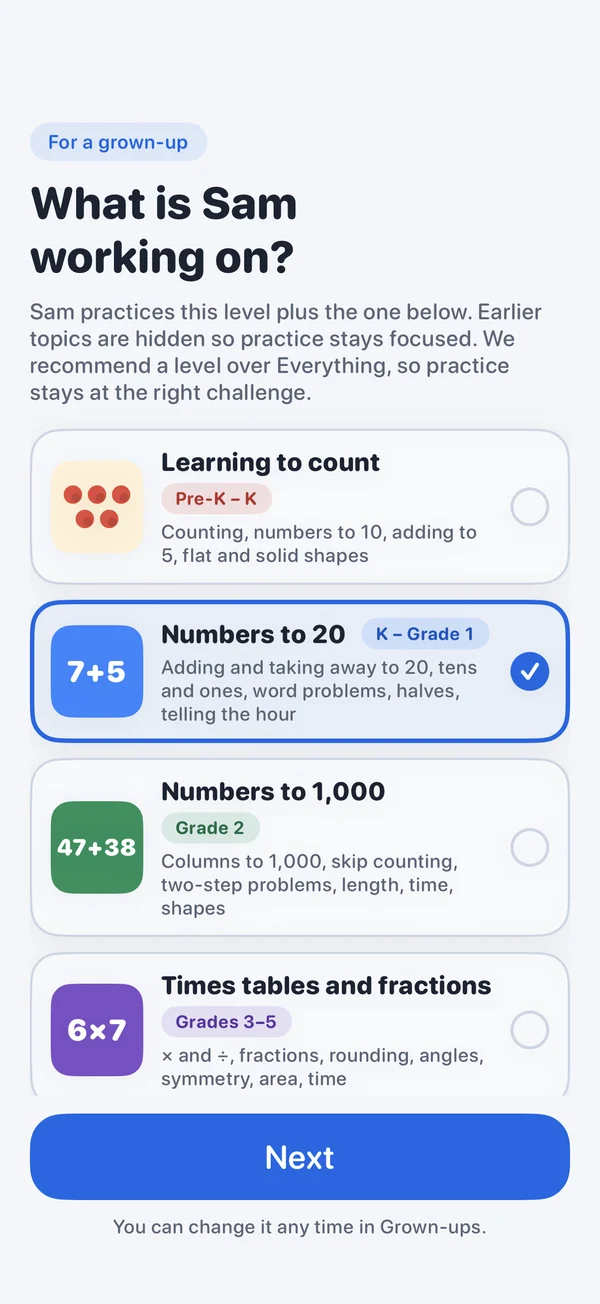
The levels
- Learning to count · pre-K to K. Counting, numbers to 10, adding to 5, flat and solid shapes.
- Numbers to 20 · K to grade 1. Adding and taking away to 20, tens and ones, word problems, halves, telling the hour.
- Numbers to 1,000 · grade 2. Columns to 1,000, skip counting, two-step problems, length, time, shapes.
- Times tables and fractions · grades 3 to 5. × and ÷, fractions, rounding, angles, symmetry, area, time.
- Everything · pre-K to grade 5. Every topic from all levels.
We recommend a level over Everything, so practice stays at the right challenge. The skills follow the US Common Core standards.
Change the level
- Open the grown-ups area.
- Tap your child, then Level.
- Tap the new level. It changes right away, on all your devices with iCloud.
With Eagerly Math Plus, the child's page also tells you when they're ready for the next level, from the Grade checklist. The app never moves a child up by itself.
Children set up before version 2.0.2 start on Everything, so nothing changes until you pick a level.